Custom field examples by industry
Fields for twelve trades, the two-part test a field has to pass, and the field that is worse than nothing because it looks authoritative and is wrong the moment the customer drives away.
Sohail Safdar · · 6 min read
A custom field earns its place if it passes two tests, and most advice only mentions the first.
Does it change what your team says or does? A dental practice knowing the insurance plan changes the conversation. Knowing the customer's birthday usually does not, unless you actually do something with it.
Will somebody keep it up to date? This is the test that eliminates most candidates, and it is the one that matters more.
The field that is worse than nothing
A stale field looks exactly like a fact. That is the whole problem.
Take "mileage at last visit" on an auto repair record. It passes test one easily: it is genuinely useful for service intervals. It fails test two completely, because it is wrong the moment the customer drives away, and nobody is going to update it between visits.
So somebody looks at 48,000, calculates that a service is not due, and is wrong by eleven months of driving. A field nobody updates is not neutral: it is a confident wrong answer waiting to be read.
The fix is usually to change what the field holds rather than to delete it. "Mileage at last visit" with the date of that visit is honest, because the reader can see how old it is. Any field recording a moving quantity needs the date beside it or it should not exist.
Field types, and the one rule about them
- Text for genuinely unique values: a name, an address, a colour formula.
- Number for counts and sizes.
- Date for anything that recurs or expires.
- Select for one choice from a fixed list.
- Multi-select for several from a list.
- Yes/no for a single fact.
Prefer select over text wherever the answers repeat. "Delta", "delta dental" and "DELTA" are three values in a text field and one in a select. That is not an aesthetic problem: it means your filter for Delta patients finds a third of them, and you conclude you have fewer than you do, and you make a decision on that.
The cost of a select is that somebody has to maintain the list. That is a real cost and it is much smaller than the one above.
Examples by trade
| Trade | Fields | Types |
|---|---|---|
| Dental | Insurance plan, preferred hygienist, last cleaning date | Select, select, date |
| Med spa | Treatments had, preferred provider | Multi-select, select |
| Medical | Insurance plan, preferred clinician, new or existing | Select, select, select |
| Home services | Service address, system type, system age | Text, select, number |
| Salon | Preferred stylist, colour formula on file | Select, yes/no |
| Automotive | Vehicle year make model, mileage at last visit plus its date | Text, number plus date |
| Veterinary | Pet name, species, vaccination due date | Text, select, date |
| Pet grooming | Breed, size, notes on file | Text, select, yes/no |
| Legal | Matter type, conflict check done | Select, yes/no |
| Accounting | Return type, filing deadline | Select, date |
| Real estate | Buying or selling, target area, timeline | Select, text, select |
| Fitness | Goal, membership type, preferred times | Select, select, multi-select |
Two things to notice in that table.
The automotive row carries a date alongside the mileage, for the reason in the section above.
The grooming row says "notes on file" as a yes/no rather than a temperament field with values in it. That is deliberate, and the next section says why.
Fields that are quietly a liability
A field that records a judgement rather than a fact. A grooming business genuinely needs to know that a dog needs careful handling. A select field containing the word "aggressive" creates a permanent label on an animal, written by whoever had the worst morning with it, that follows the customer for years and that they can ask to see. "Notes on file: yes" plus a factual note is the same information with none of that.
The same applies to any people-facing equivalent. There is no good version of a customer field containing "difficult".
A field holding clinical, legal or financial detail. This is a storage decision rather than a convenience one: putting a diagnosis, a matter detail or a payment credential into a general business system puts it somewhere that may not be built for it, and somewhere more people can see. Keep the clinical record in the clinical system and hold a pointer, not a copy.
Field, tag or note
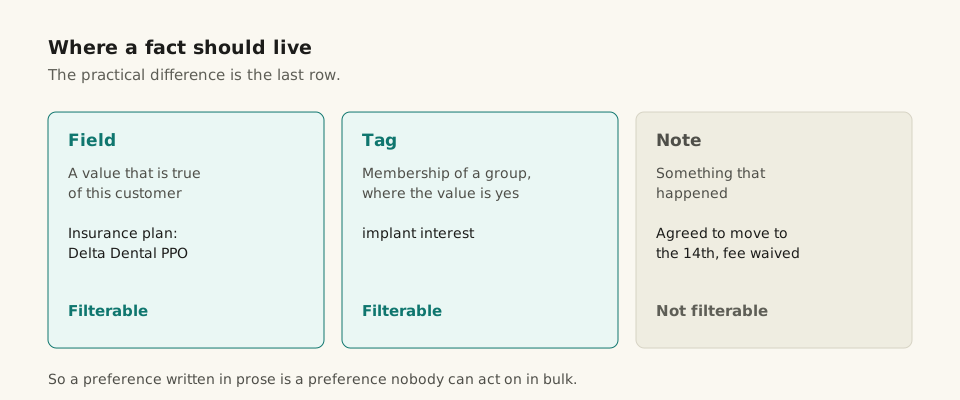
The three-way choice, in one line each:
- A field holds a value that is true of this customer. Insurance plan. Pet species.
- A tag marks membership of a group where the value is just yes or no. "Implant interest". "VIP".
- A note records something that happened.
Fields and tags can be filtered and segmented. Notes cannot. That is the entire practical difference, and it means a preference written in prose is a preference nobody can act on in bulk.
Pruning
Three months after adding a field, look at how many contacts have it filled in.
Mostly empty means delete it. An empty field is not harmless: it makes the record longer, it makes the form slower to complete, and it makes every other field slightly more likely to be skipped. A record half-filled is a record nobody trusts, and the way records end up half-filled is one optional field at a time.
The honest number for a small service business is two to five industry fields. If you have fifteen, you have a form rather than a record.
In Frontiva
Custom fields sit on the contact alongside notes, tags and a lifecycle stage, which is the four-way division this post argues for rather than one box for everything.
Saved segments run on those fields and tags: name a filter once, such as lapsed customers or anybody tagged implant, and reuse it on the contact list or as a campaign audience. That reuse is the payoff for having put a fact in a field rather than a sentence, and it is the thing that makes the two-part test at the top worth applying strictly.
CSV import maps your columns onto those fields with a preview that matches exactly what commits, so an import of existing records does not quietly create the "Delta / delta dental / DELTA" problem described above on day one. Export is permission-gated.